Oracle TimesTen In-Memory Database Documentation http://download.oracle.com/docs/cd/E11882_01/timesten.112/e13076/overview.htm#CEGGJACG OPTIMIZER http://download.oracle.com/docs/cd/E11882_01/timesten.112/e13065/query.htm DBMS_RANDOM http://download.oracle.com/docs/cd/E11882_01/timesten.112/e14000/d_random.htm
Oracle TimesTen In-Memory Database Release 11.2.1
Part Number
Link
Download
Description
E13085-01
View Library
Download (21 MB)
Oracle® TimesTen In-Memory Database Documentation Media Library 11g (11.2.1)
N/A
PDF
N/A
ODBC 2.0 Programmer's Manual
Part Number
Link
Download
Description
N/A
HTML
N/A
Release Notes*
N/A
TXT
N/A
Behavior Changes*
N/A
HTML
N/A
Oracle TimesTen Online Documentation
N/A
PDF
N/A
Oracle TimesTen Documentation Addendum
N/A
PDF
N/A
Oracle TimesTen Introduction
N/A
PDF
N/A
Oracle TimesTen Installation Guide
N/A
PDF
N/A
Oracle TimesTen API Reference Guide
N/A
PDF
N/A
Oracle TimesTen Application Server and Object-Relational
Mapping Framework Configuration Guide
N/A
PDF
N/A
Oracle TimesTen C Developer's and Reference Guide
N/A
PDF
N/A
Oracle TimesTen Cache Connect to Oracle Guide
N/A
PDF
N/A
Oracle TimesTen Error Messages and SNMP Traps
N/A
PDF
N/A
Oracle TimesTen Java Developer and Reference Guide
N/A
PDF
N/A
Oracle TimesTen Operations Guide
N/A
PDF
N/A
Oracle TimesTen Replication Guide
N/A
PDF
N/A
Oracle TimesTen SQL Reference Guide
N/A
PDF
N/A
Oracle TimesTen Troubleshooting Guide
N/A
PDF
N/A
Oracle TimesTen TTClasses Guide for C++ Developers
N/A
PDF
N/A
Oracle TimesTen 7.0 Best Practices Guide
N/A
PDF
N/A
ODBC 2.0 Programmer's Manual
* are new in 7.0.5, the rest of the docs are the same as the 7.0.4 release
PL/SQL
2010년 3월 21일 일요일
TimesTen Document

2010년 3월 20일 토요일
TimesTen 설정
TimesTen 다운로드
DATABASE 생성
설치한 TimesTen 폴더에 있는 odbc.ini 파일을 home에 복사한다.
.odbc.ini 파일을 연다.
해당 위치를 찾아서 아래의 형식으로 필요한 정보들을 추가한다.
#####################################################################
#
# New data source definitions can be added below.
#
#####################################################################
[mydb] -- DATABASE 이름
Driver=/home/timesten/TimesTen/tt1121/lib/libtten.so
DataStore=/tmp/mydb -- DATABASE DATA(LOG) 가 저장될 디스크 위치
PermSize=1024 -- MEMORY DATABASE SIZE (MB)
TempSize=512 -- MEMORY TEMP SIZE (MB)
PLSQL=1
DatabaseCharacterSet=AL32UTF8
TimesTen 서버 실행
TimesTen Daemon startup OK.
isql 실행
[timesten@ljh8324-skku ~]$ ttisql
Copyright (c) 1996-2009, Oracle. All rights reserved.
Type ? or "help" for help, type "exit" to quit ttIsql.
Command>
Target DATABASE 실행
Command> connect mydb;
Connection successful: DSN=mydb;UID=timesten;DataStore=/tmp/mydb;DatabaseCharacterSet=AL32UTF8;
ConnectionCharacterSet=US7ASCII;DRIVER=/home/timesten/TimesTen/tt1121/lib/libtten.so;
PermSize=1024;TempSize=512;TypeMode=0;
(Default setting AutoCommit=1)
Command>
Install TimesTen 7.0
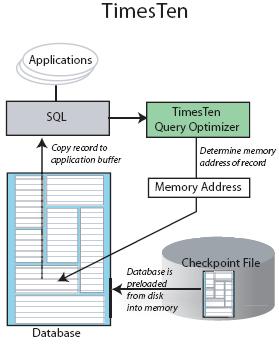
This post covers installation of Oracle TimesTen In-Memory Database. I am going to use this TimesTen Database as repository for Oracle Communication and Mobility Server (OCMS ) installation in my future post.
What is TimesTen In-Memory Database ?
TimesTen is memory resident relational database for fast response and high throughput. TimesTen database is used by applications/industry which require very quick turn around time from database like Telecommunication, Defence.
Prepare for TimesTen Installation
1. Add timesten operating system user like
useradd timesten
2. Create directory/etc/TimesTen owned by user timesten
(This directory is used as Instance Registry by TimesTen Database)
mkdir /etc/TimesTen (from root user)
chown timesten:timesten /etc/TimesTen (from root User)
3. Download software TimesTen In-Memory database
from here
TimeTen Installation on Linux
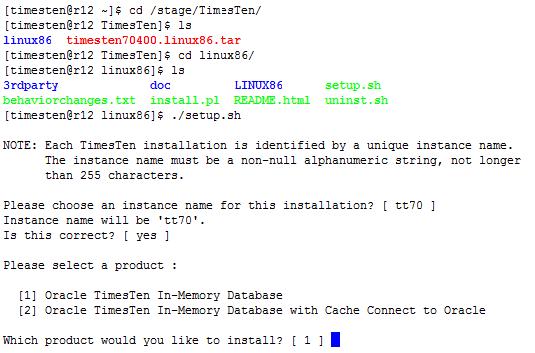
1. Unzip software (tar file) like tar -cvf timesten70400.linux86.tar and change directory to linux86
2. Start Installation by running setup.sh and choose default product 1. to install i.e. Oracle TimeTen In-Memory database (This is requirement for OCMS - Oracle Communication and Mobility Server)
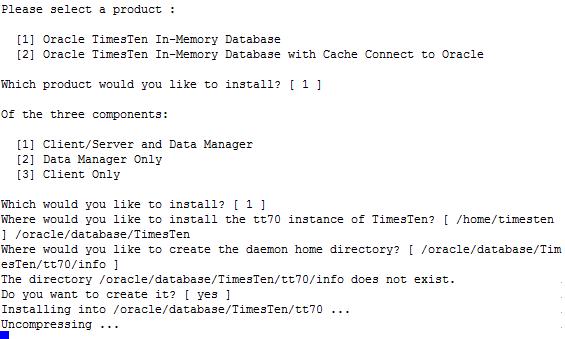
3. When prompted for component select default 1 i.e. Client/Server and Data Manager 4. When prompted for installation directory either change directory of your preference or choose default location i.e. $HOME
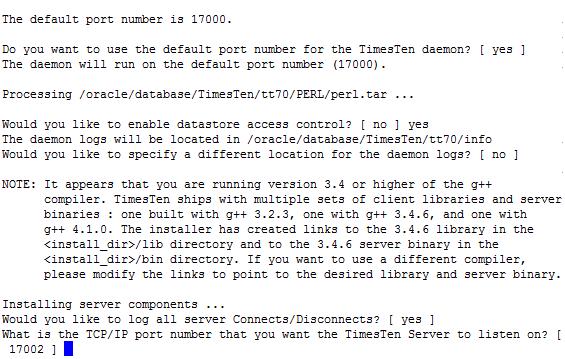
5. When prompted for Would you like to enable datastore access controlselect NO (Ensure you choose No for OCMS usages)

6. Choose default options for rest of installation
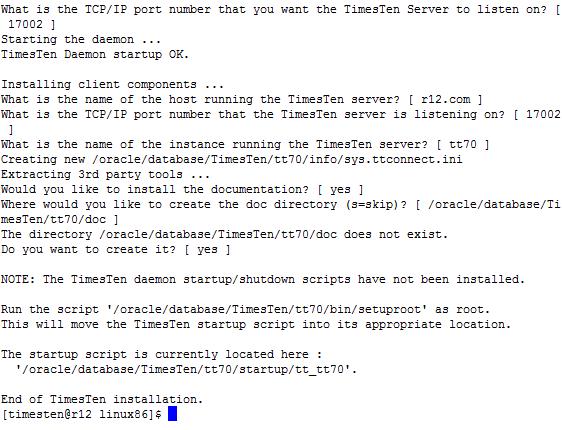
Verifying that Times Ten Database is up and running
$TimesTen_Home/bin/ttStatus
Starting / Stopping Times Ten
$DatabaseTimesTen_Home/bin/ttdaemonadmin -start
$TimesTen_Home/bin/ttdaemonadmin -stop
Related
–Oracle TimesTen Documentation Library
–Download TimeTen Database from here
–Oracle TimesTen In-Memory Database Homepage
출처 :